
Game Overview
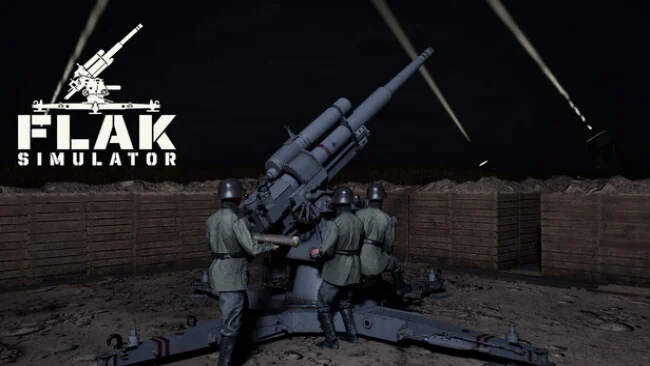
Few co-op games turn a single artillery piece into such a demanding shared workplace. Flak Simulator puts up to five players around a German 88 mm anti-aircraft gun during the Second World War, asking the crew to hold off incoming bomber formations through communication and practiced coordination. Its tone is focused and mechanical rather than heroic: every successful shot comes from reading the sky, handling heavy equipment, and correcting mistakes before the next wave arrives.
One player tracks aircraft and reports distance, others rotate and elevate the gun, set each shell’s timed fuze, operate the breech, or haul ammunition from supply points. Shell bursts provide the essential feedback loop; a detonation behind the formation, below it, or too early forces the crew to alter its lead and fuze timing for the next attempt. Roles remain flexible, so teams can split horizontal and vertical aiming between two people or let a capable operator manage both while others keep rounds flowing. Day missions make formations easier to follow, while night operations rely on searchlights and demand closer attention as damaged planes lose parts, suffer engine trouble, and fall from the sky.
What separates Flak Simulator from a conventional shooter is its interest in the labor behind the weapon rather than simple target practice. The shared-gun mode makes communication the real skill ceiling, creating the kind of organized chaos familiar to players of Barotrauma or the more simulation-minded side of Hell Let Loose. Arcade mode offers a more accessible alternative, giving each player an individual gun while automated crews handle ranging, loading, and fuze work; earned experience can then improve those support crews between rounds. It suits groups who enjoy specialized co-op jobs and methodical military simulation, while solo players or newcomers can use Arcade mode to learn the rhythm of aiming and leading targets without coordinating an entire battery crew.
Screenshots
Installation
- Select the Download button at the top of this page to open UploadHaven.
- On UploadHaven, wait for any countdown, then select Free Download. Optional: UploadHaven Pro for faster downloads.
- When complete, extract the archive to a Flak Simulator folder using 7-Zip.
- Open the extracted folder and start the game normally.
- For errors, check Setup Guide & Troubleshooting below. Keep your security software enabled.
System Requirements
- OS: Win 10
- Processor: AMD Ryzen 5 3600 or Intel Core i5-10400
- Memory: 16 GB RAM
- Graphics: GeForce RTX 2060 Super 8 GB or Radeon RX 6600 8 GB
- DirectX: Version 12
- Network: Broadband Internet connection
- Storage: 20 GB available space
- Additional Notes: Microphone recommended
Setup Guide & Troubleshooting
How do I fix missing DLL errors for Flak Simulator?
After extracting Flak Simulator, navigate to the _Redist or _CommonRedist folder inside the game directory and install DirectX, Vcredist, and any other dependencies included.
What should I do if the downloaded file is corrupted?
The full archive is 18.20 GB — make sure your download completed fully before extracting. Use 7-Zip to extract the files. If you still see a "file corrupted" error, re-download and try again.
Do I need to run the game as administrator?
Usually, no. Start the game normally from the extracted folder. If you see a permissions or save error, check that the folder is writable and follow the game's documented fix. Only grant administrator access when a trusted game's specific setup requires it.
How do I update my GPU drivers for this game?
The game won't launch — what should I try?
Check that extraction completed and your PC meets the system requirements, including Version 12. Note any error message before choosing a fix. If it identifies a missing runtime, install the required DirectX components or Microsoft Visual C++ Redistributable from Microsoft.
My antivirus is blocking the game — is it safe?
A warning needs to be investigated; the download source alone cannot confirm that a file is safe. Keep your security software enabled and review the detection details. Do not run or restore a flagged file unless you have verified that it is a false positive. If you are unsure, leave it quarantined.
