
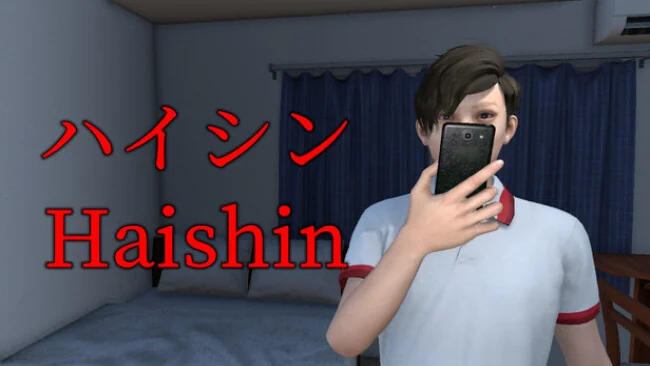
Game Overview
A quiet room becomes an increasingly hostile place in this first-person psychological horror story about an ordinary livestream gone wrong. You begin by showing viewers around your home, treating the broadcast like a casual late-night routine, but small disturbances soon make that familiar space feel unsafe. Haishin leans into intimate, domestic fear rather than monsters or action, using isolation, uncertainty, and the uncomfortable feeling of being watched to create its tension.
Play unfolds as a focused first-person walking-simulator experience built around observing your surroundings and following the unraveling events of a single night. Movement, environmental interaction, and careful attention to subtle changes carry the experience; the danger comes less from mechanical challenge than from deciding what is real and what your character may be imagining. The game keeps its scope tight, making each new sound, altered object, or strange moment in the apartment matter. Two endings give players a reason to revisit the story and look more closely at the choices or details they may have missed the first time.
Haishin stands out through its livestream framing, which turns a modern everyday activity into an unsettling lens for paranoia and performance. Its restrained approach should appeal to players who prefer slow-burn atmosphere over chase sequences, inventory management, or combat-heavy survival horror. The compact format makes it a good fit for a tense evening session, as well as for creators looking for a horror game that invites audience reactions and speculation. Fans of Japanese-style indie horror, especially experiences in the vein of Fears to Fathom or Chilla’s Art’s grounded scenarios, are likely to appreciate its close-quarters dread and ambiguous psychological edge.
Screenshots
Installation
- Select the Download button at the top of this page to open UploadHaven.
- On UploadHaven, wait for any countdown, then select Free Download. Optional: UploadHaven Pro for faster downloads.
- When complete, extract the archive to a Haishin folder using 7-Zip.
- Open the extracted folder and start the game normally.
- For errors, check Setup Guide & Troubleshooting below. Keep your security software enabled.
System Requirements
- Requires a 64-bit processor and operating system
- OS: Windows 11
- Processor: 11th Gen Intel(R) Core(TM) i7-11800H @ 2.30GHz
- Memory: 16 GB RAM
- Graphics: NVIDIA GeForce RTX 3050 Ti Laptop GPU
- Storage: 4 GB available space
Setup Guide & Troubleshooting
How do I fix missing DLL errors for Haishin (v1.0.3)?
After extracting Haishin (v1.0.3), navigate to the _Redist or _CommonRedist folder inside the game directory and install DirectX, Vcredist, and any other dependencies included.
What should I do if the downloaded file is corrupted?
The full archive is 2.88 GB — make sure your download completed fully before extracting. Use 7-Zip to extract the files. If you still see a "file corrupted" error, re-download and try again.
Do I need to run the game as administrator?
Usually, no. Start the game normally from the extracted folder. If you see a permissions or save error, check that the folder is writable and follow the game's documented fix. Only grant administrator access when a trusted game's specific setup requires it.
How do I update my GPU drivers for this game?
The game won't launch — what should I try?
Check that extraction completed and your PC meets the system requirements. Note any error message before choosing a fix. If it identifies a missing runtime, install the required DirectX components or Microsoft Visual C++ Redistributable from Microsoft.
My antivirus is blocking the game — is it safe?
A warning needs to be investigated; the download source alone cannot confirm that a file is safe. Keep your security software enabled and review the detection details. Do not run or restore a flagged file unless you have verified that it is a false positive. If you are unsure, leave it quarantined.
